Digital loyalty cards. Made for your customers’ wallets.
A digital loyalty card lets customers collect rewards using a branded pass saved to Apple Wallet or Google Wallet. Your programme decides what earns a stamp, points or another benefit. The wallet holds the card; MSTRMND manages the rewards and the customer activity you record.
Give customers a reason to return and a straightforward way to take part. They join through your signup link or QR code, save the card, and show it when they visit. Your team scans it to record eligible activity.
The useful question is what happens after signup: can customers understand the reward, can staff award it consistently, and can you see whether members return?
Costa Club: recognise progress at a glance
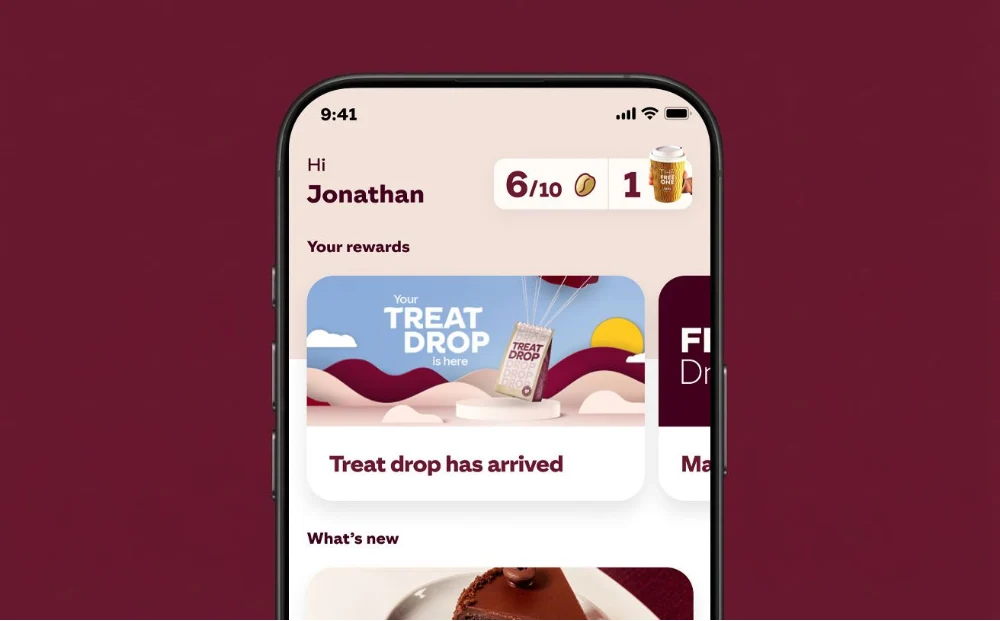
Costa’s official programme image places its Bean progress and an available reward together. It is a useful example of making the programme recognisable on a phone.
Source: Costa Club programme.
What is a digital loyalty card?
A digital loyalty card is the customer-facing part of a rewards programme. It identifies a member and can display information such as stamp progress, a points balance or membership status, depending on the card and setup.
For a café, the offer might be a selected drink after eight qualifying purchases. For a salon, it might be points towards a defined treatment add-on. A membership card can identify customers who have subscribed to an ongoing benefit.
Those are different offers. Saving them to a phone does not make them the same programme.
Digital reward card, electronic loyalty card, virtual stamp card: the same thing?
Mostly, yes. Digital reward card, electronic loyalty card, virtual loyalty card and online loyalty card all describe the same object under different names: a customer loyalty card that lives on a phone rather than in a wallet. Searching for any of them will turn up much the same products.
Two of the names are narrower than they look. A digital stamp card describes the stamp mechanic specifically — collect ten, get one free — rather than points, cashback or membership. A digital rewards card is sometimes used for a prepaid or gift balance instead of earned rewards, so it is worth checking which one a supplier means.
What matters more than the name is how the card is read at the counter. A customer loyalty card carries a barcode or QR code that staff scan on a visit, which is what lets the same card work at a till, in a treatment room and against an online order. MSTRMND cards sit in Apple Wallet and Google Wallet, so there is no separate app for the customer to install, and customers join by scanning a QR code rather than registering an account.
Compare your main options
| Option | Customer experience | Business process | Consider before choosing |
|---|---|---|---|
| Paper stamp card | Carry a physical card and present it | Staff stamp qualifying purchases | Limited visibility of who owns or uses each card |
| Apple Wallet or Google Wallet card | Save a pass and show it during a visit | Staff scan the card and record eligible activity | Requires a supported phone and a consistent scanning process |
| Dedicated loyalty app | Install the business’s chosen app | Run the programme through that app | Check the download, registration and login steps |
| POS-linked programme | Identify membership at checkout | Supported transactions feed the loyalty system | Check compatibility, supported locations and integration costs |
These choices can overlap. A wallet card may work with a POS integration, but putting a card in a wallet does not create that integration.
Choose the behaviour before the reward
“Increase loyalty” is too broad to guide a launch. Choose something you can observe: a first-time customer makes a second visit; a regular books again; or an inactive member returns.
Then decide which activity qualifies. A stamp for every visit and a stamp for every eligible drink purchase produce different results. One customer ordering four coffees could receive one stamp or four, depending on your rules. Decide before the customer reaches the counter.
| Your objective | Programme to explore | First thing to define |
|---|---|---|
| Encourage repeat purchases of a similar item | Digital stamps | Qualifying item and reward threshold |
| Recognise different purchase values | Points or cashback-style credit | Earning rate and redemption value |
| Sell a block of future visits | Prepaid pass | Included visits, validity and booking conditions |
| Offer ongoing paid benefits | Membership | Benefits, billing and cancellation terms |
| Run a specific promotion | Coupon | Eligibility, expiry and redemption limit |
How the customer journey works
- Join. The customer scans your signup QR code or opens your link.
- Save. They complete the configured signup and add the card to their supported wallet.
- Present. On an eligible visit, they open the card for your team to scan.
- Earn. Staff record the qualifying purchase or visit.
- Redeem. Your team applies the reward according to the published rules.
Customers do not need a separate MSTRMND loyalty app. Google Wallet may need to be installed or set up on an Android phone. Your staff use the scanner app; that is a separate part of the journey.
See the full digital loyalty card walkthrough.
What MSTRMND adds behind the card
MSTRMND combines branded wallet cards with customer records and rewards management. Your dashboard can show recorded visits, spend and last visits, helping you identify regulars and members whose activity has slowed.
The quality of that view depends on what your team or configured integrations record. A customer buying without presenting their card may not appear as a loyalty visit.
Flann is an optional AI business operations platform that connects business tools and helps with marketing, conversations and everyday tasks. Combined with MSTRMND, it can use available loyalty context in relevant workflows. Adding a wallet card does not automatically add Flann, connect every tool or authorise every message.
Connect the balance with the next action
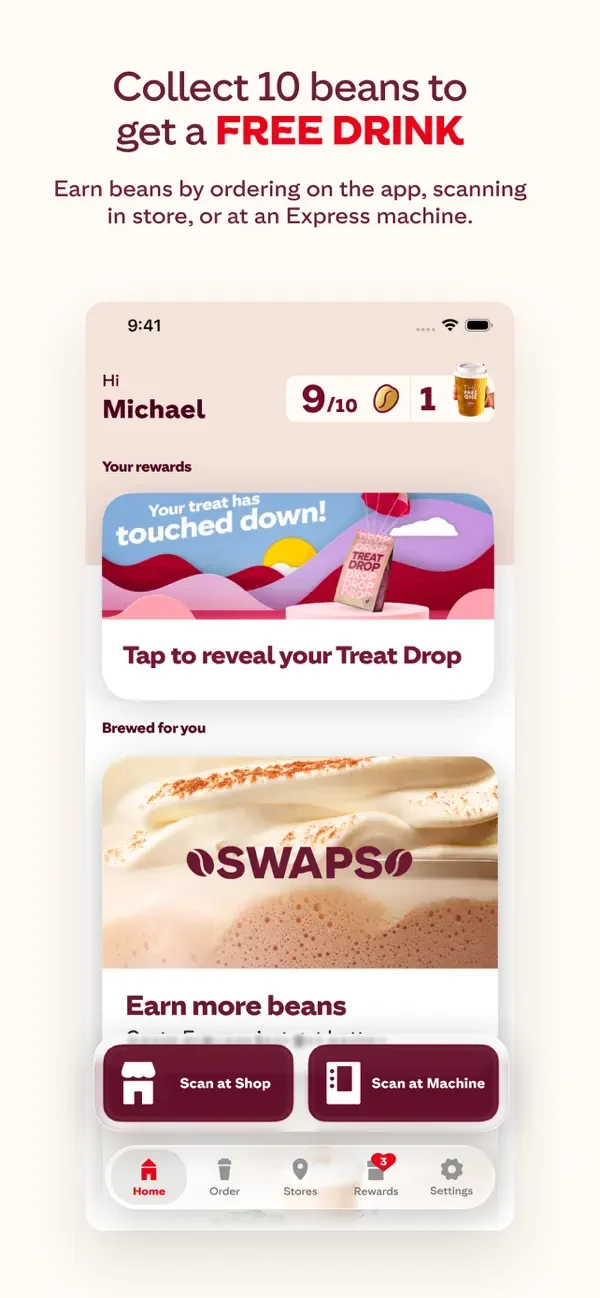
Costa’s issuer-provided screenshot puts scan controls alongside reward progress. Your own card journey should make the next customer action equally clear.
Source: Costa Club programme · Official app screenshots.
Explore the loyalty guides
- How digital loyalty cards work: signup, wallet installation, scanning and redemption.
- Digital loyalty card examples: practical offers for cafés, salons, barbers and shops.
- Types of loyalty programmes: compare stamps, points, credit and other card formats.
- Benefits and disadvantages: weigh the customer journey against costs and workload.
- What makes a good loyalty scheme: turn the idea into clear rules.
- How to set up your programme: move from planning to a tested launch.
Pro tip. Ask a staff member to explain the offer in one sentence. If they need to explain a conversion rate, three exclusions and a second card before the customer understands it, simplify the offer.
Frequently asked questions
Is a digital loyalty card the same as Apple Pay or Google Pay?
No. A loyalty pass identifies membership and supports the reward programme. It is not a payment card. Do not assume a payment automatically awards points unless your configured integration supports that workflow.
Do customers need to download an app?
They do not need a separate MSTRMND loyalty app. They need a compatible wallet on a supported phone. The customer’s wallet and your team’s scanner app have different roles.
Can I use my own branding?
Yes. MSTRMND supports branded cards. Use a recognisable logo, readable text and a reward statement that matches the programme rules.
Are digital cards always better than paper?
No. Paper can suit a very simple programme. Digital becomes more useful when you need identifiable customer activity, balances and follow-up workflows, and your team can run the process reliably.
Can a small business run more than one card type?
MSTRMND supports several formats, with availability depending on the plan and configuration. Start with the simplest combination your staff and customers can understand.
Will a loyalty card guarantee more sales?
No. The offer, customer experience, staff execution and purchasing cycle all matter. Track a defined objective and compare outcomes rather than treating every member purchase as an extra sale.
Where should I start?
Choose one behaviour, write the reward rule, and test the signup-to-redemption journey. Use the setup guide to work through the decisions.
See your programme in a customer’s wallet
Bring your logo, a typical purchase and a reward idea. We’ll walk through how the card and staff process could work for your business.
Book a MSTRMND demo or compare programme types.